
Download Astrology for Windows – Astrological Calculations, Tropical and Sidereal Zodiacs, Detailed Reports
Overview
Astrology for Windows is a specialized software designed to support advanced astrological analysis through precise calculations and comprehensive data integration. The application enables users to generate detailed astrological charts and reports, making it a valuable tool for both amateur enthusiasts and professional astrologers. Its core functionality revolves around planetary positioning, house system selection, and accurate time zone handling—critical components in producing reliable astrological interpretations.
The software is particularly suited for individuals who require historical and future planetary data across a broad timeline, spanning up to 8,000 years. This depth of coverage allows users to explore birth charts, transits, and historical events with confidence in the accuracy of calculations. The inclusion of both Tropical and Sidereal zodiac systems ensures compatibility with various astrological traditions, including Western, Vedic, and other regional practices.
Real-world applications include personal chart analysis, relationship compatibility assessments (synastry), and historical event charting. The program’s robust data infrastructure, particularly the Yellow Book Atlas with coordinates and time zone details for over 9,000 cities across 250 countries, helps prevent inaccuracies stemming from outdated or incorrect geographical data. While the developer did not provide additional technical details, the software’s long-standing presence in the astrological community suggests a strong foundation in reliability and user trust.
Within the digital ecosystem of astrological tools, Astrology for Windows occupies a niche for users seeking desktop-based precision and depth beyond basic mobile astrology apps. Its focus on comprehensive reporting and customizable output formats reinforces its role as a professional-grade utility in the field.
Key Features & Functionality
- Planetary Calculations Across 8,000 Years: The software performs planetary calculations using both Tropical and Sidereal zodiacs, covering a vast historical and future timeline. This allows users to analyze charts for any date within this range, supporting both personal and historical astrological research.
- Seven House Systems: Users can select from seven different house systems, enabling tailored interpretations based on astrological tradition or personal preference. This flexibility enhances the software’s adaptability across diverse analytical approaches.
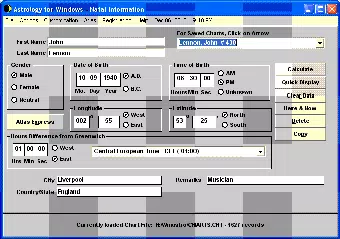
- Yellow Book Atlas Integration: The inclusion of a detailed atlas with historical coordinates and time zone data for over 9,000 cities ensures accurate chart generation, especially when working with past or future dates where time zone changes may affect results.
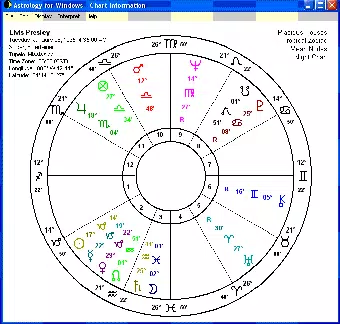
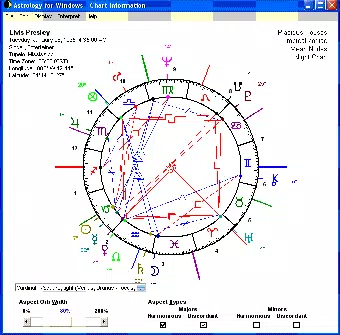
- Graphical Chart Display: Astrology for Windows offers two visual formats—classic wheel and interactive wheel with aspect lines. The interactive version allows users to explore planetary relationships dynamically, aiding in the identification of complex astrological patterns.
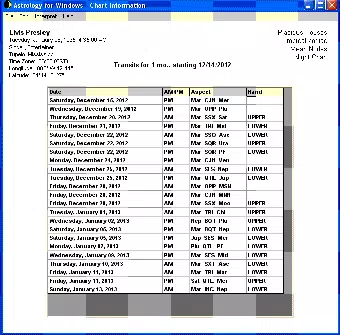
- Extensive Report Generation: The software produces detailed reports, including a 40-page Classic British Astro Report for individual charts and a Soul Healing Transits Report for analyzing current planetary movements. Reports can be exported in PDF or HTML formats for sharing, archiving, or further study.
- Synastry and Compatibility Analysis: Users can compare multiple charts simultaneously to assess astrological compatibility. This feature supports relationship analysis by highlighting key aspects between individuals’ charts, making it useful for both personal and professional astrological consultations.
These features collectively serve users engaged in in-depth astrological work, whether for personal insight, academic research, or professional practice. The ability to export reports in standard formats adds practical value for users who need to share findings with clients or colleagues.
Interface, UX & Performance
The interface of Astrology for Windows appears designed with functionality and clarity in mind, prioritizing access to core tools over flashy visuals. Navigation is likely structured around a menu-driven layout, allowing users to move between chart generation, report creation, and data management with minimal friction. The use of dual graphical chart displays—classic wheel and interactive wheel—suggests a focus on both traditional presentation and modern interactivity.
Although the developer did not list formal performance metrics, the software’s ability to handle large datasets, including historical time zones and extended planetary calculations, implies optimized backend processing. Users should expect stable operation when working with standard chart inputs, though performance may vary depending on system specifications such as RAM and processor speed.
Responsiveness across different device categories is not specified, but the application’s desktop nature suggests it is intended for use on Windows PCs rather than mobile devices. Stability is likely maintained through years of development and user feedback, especially given its release date in 2013. However, users on older Windows systems may encounter compatibility challenges if the software lacks updated system requirements.
Overall, the user experience appears tailored for users familiar with astrological terminology and data input, minimizing the need for extensive onboarding. The absence of mobile-specific design elements confirms its role as a desktop-focused tool, emphasizing depth over simplicity.
Platform Compatibility & Technical Requirements
Astrology for Windows is designed for the Windows operating system. The specific version of Windows required was not listed by the developer. Similarly, no formal minimum OS requirements were disclosed, nor were any device-specific compatibility details provided.
The file size of the application is not specified in the available documentation. This omission makes it difficult to assess storage implications or installation feasibility on systems with limited space. However, given the software’s extensive data set—including the Yellow Book Atlas and multi-century planetary calculations—the file size is likely substantial.
As the release date is 2013-02-07, users should consider whether the software remains compatible with modern Windows versions. While many legacy applications continue to function through compatibility layers, this is not guaranteed. The lack of recent updates or version information raises questions about ongoing support, though the software’s enduring presence suggests continued usability.
Pros and Cons
- Supports both Tropical and Sidereal zodiac systems for broad astrological compatibility
- Includes a comprehensive atlas with historical time zone data for accurate chart generation
- Offers multiple house systems and advanced report generation options
- Provides interactive and classic chart visualizations for deeper analysis
- Enables synastry and compatibility analysis between multiple charts
- Reports can be exported to PDF and HTML for easy sharing and archiving
- Platform is limited to Windows; no mobile or macOS availability confirmed
- Release date is from 2013, raising questions about modern OS compatibility
- Developer did not provide current system requirements or file size
- No information on update frequency or technical support
- Interface may be complex for users unfamiliar with astrological concepts
FAQ
Is Astrology for Windows available for Android or iOS?
The developer did not specify availability on mobile platforms. The application is designed for Windows, and no information confirms its functionality on Android or iOS devices.
Can I use Astrology for Windows for historical chart calculations?
Yes. The software supports planetary calculations across an 8,000-year timeline, making it suitable for generating accurate charts for historical dates.
What file formats are supported for report export?
Reports can be exported in PDF and HTML formats, allowing for easy sharing, printing, and digital archiving.
Does the software include time zone data for past events?
Yes. The Yellow Book Atlas includes historical time zone information for over 9,000 cities, helping ensure accuracy in charts generated for past dates.
Is the software regularly updated?
The developer did not provide information on update frequency. The last release was in 2013, which may indicate limited ongoing maintenance.
Final Thoughts
Astrology for Windows stands as a dedicated, feature-rich tool for users seeking precision in astrological analysis. Its support for multiple zodiac systems, extensive historical data, and customizable report generation make it a strong choice for serious practitioners. While its desktop-only nature and outdated release date present potential compatibility concerns, the software’s depth and reliability continue to serve its niche audience.
Those who rely on accurate, long-term planetary calculations and detailed chart interpretations will find significant value in this application. It is particularly well-suited for professional astrologers, researchers, and dedicated enthusiasts who require tools beyond basic mobile astrology apps.
Despite the lack of modern updates and platform expansion, the software’s core functionality remains robust. For users committed to in-depth astrological work, Astrology for Windows offers a dependable solution.
Download Astrology for Windows now


